




ScalperIntel
Wyckoff Volume Spread Analysis
Wyckoff Volume Spread Analysis
Up to 2
machines per license
- Instant download after checkout
- Lifetime updates included
- NinjaTrader 8 compatible
- Direct support from the team
Enter it to unlock an offer.
Your offer is on its way.
We've emailed your offer. Check your inbox (and spam) for the link to get started.
Couldn't load pickup availability
Overview
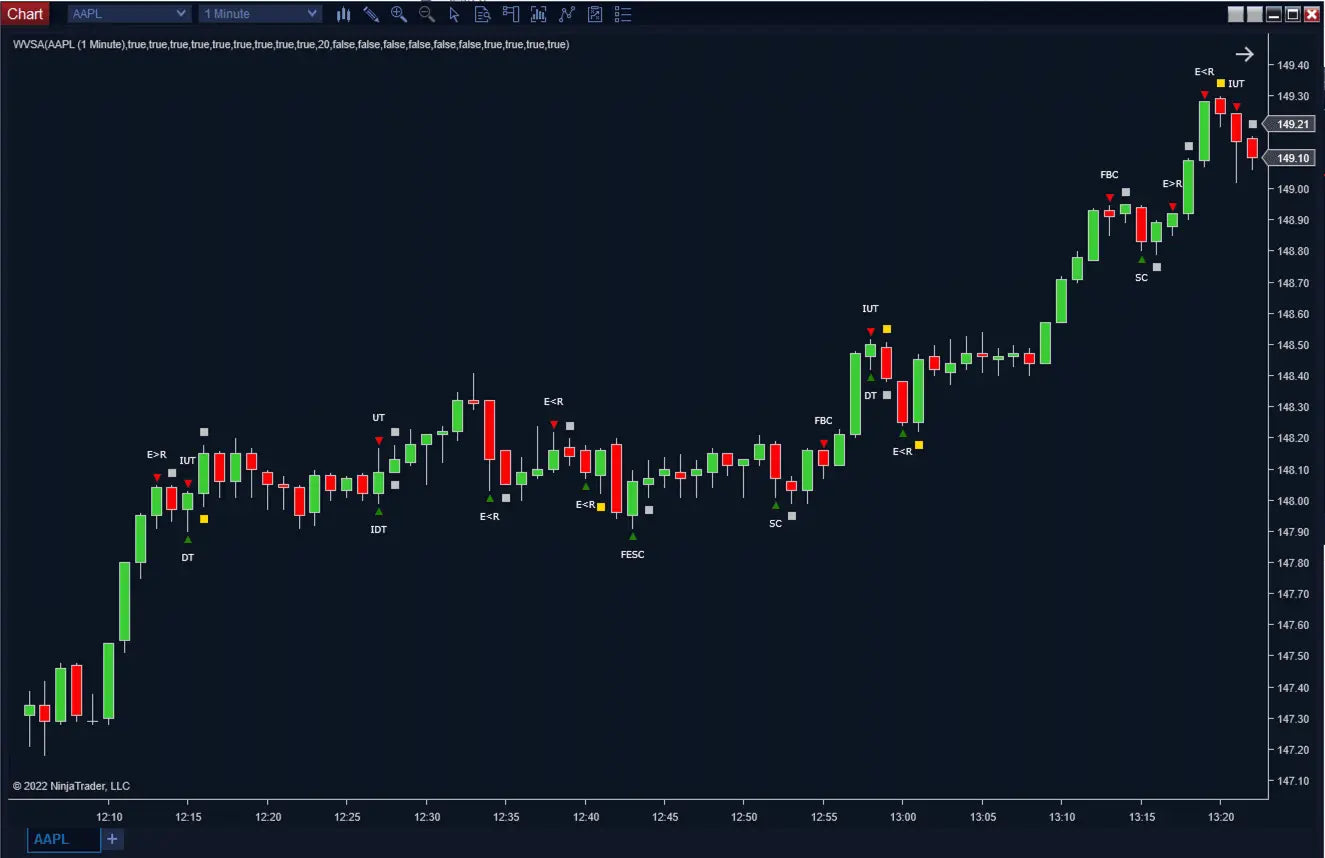
Wyckoff Volume Spread Analysis (WVSA) for NinjaTrader 8 — identifies Sign of Strength (SOS) and Sign of Weakness (SOW) conditions directly on the chart using volume, spread, wick structure, and next-bar behavior, detecting Down Thrust, Selling Climax, No Supply, Up Thrust, Buying Climax, No Demand and effort-vs-result patterns.
Built for Wyckoff and VSA traders who want structured pattern detection with next-bar confirmation logic. Non-repainting, automation-ready, Strategy Builder compatible.
What Makes It Different
Trading Concepts You'll Use
- Wyckoff price-volume analysis
- Volume Spread Analysis (VSA)
- Sign of Strength / Sign of Weakness
- Effort vs result relationships
- Climax & thrust patterns
- No Supply / No Demand continuation
Features
Core Detection
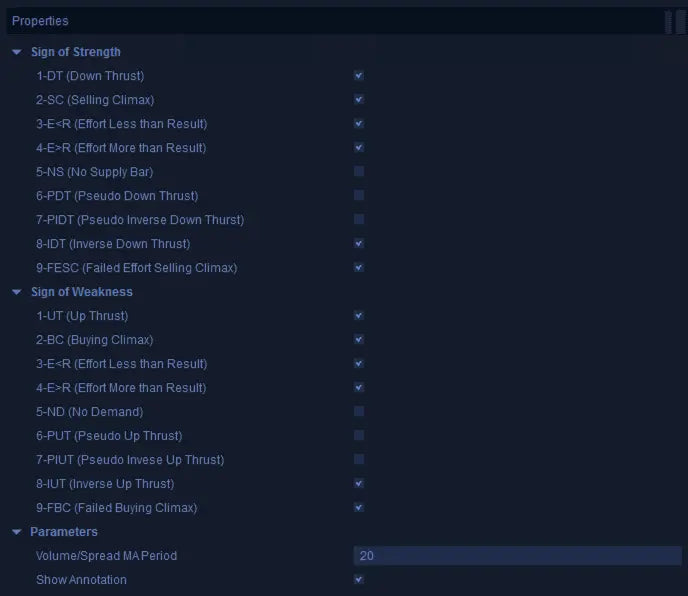
- SOS Patterns: Down Thrust (DT), Selling Climax (SC), E<R, E>R, No Supply (NS), PDT, PIDT, IDT, Failed Selling Climax (FESC).
- SOW Patterns: Up Thrust (UT), Buying Climax (BC), E<R, E>R, No Demand (ND), PUT, PIUT, IUT, Failed Buying Climax (FBC).
- Chart Triangle Markers: SOS and SOW events marked directly on candles for quick visual recognition.
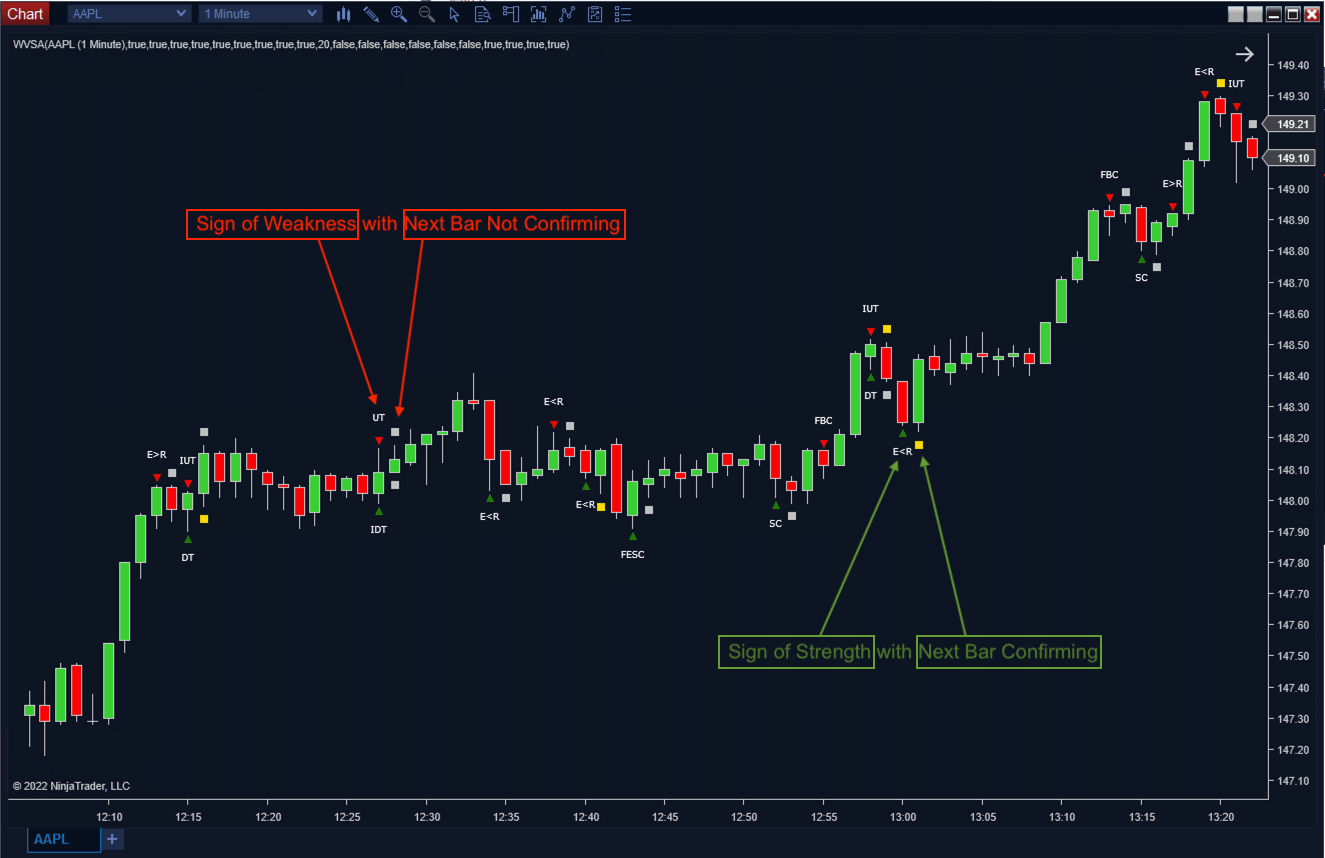
- Next-Bar Confirmation: Gold rectangles for confirmed signals, silver for refuted.
- Configurable Volume Filtering: Tune VSA analysis to instrument and timeframe.
- Adjustable Pin Bar Filtering: Control how pin bars affect detection.
- Doji Handling: Configurable behavior for doji candles.
- Label Customization: Adjust offset, font, signal colors.
Automation & Pro Tools
- Hidden Plots: Strength impact, weakness impact, SOS category, SOW category, spread, midpoint, upper wick, lower wick, candle color calculation, volume type, next-bar category, and next-bar confirmation values — all exposed for Strategy Builder.
- Pattern-Specific Filtering: Build strategies around specific pattern categories (1 to 9).
- Backtest-Ready: Non-repainting bar-close signals for reliable historical testing.
- Confluence-Friendly: Pair with S/R, supply / demand zones, Volume Levels, or market structure.
How It Compares
How this stacks up against typical volume indicators on the market.
| Feature | ScalperIntel | Typical Volume Indicators |
|---|---|---|
| Signal Logic | ✔ Structured SOS / SOW | ✖ Volume bars / simple spikes |
| Price-Volume Relationship | ✔ Spread, volume, wick, direction | ✖ Often missing |
| Next-Bar Confirmation | ✔ Confirms or refutes signal | ✖ No follow-through logic |
| Repainting | ✔ Non-repainting | ⚠ Varies |
| Automation | ✔ Hidden plots for Strategy Builder | ✖ Visual only |
| Pattern Coverage | ✔ 9 distinct categories | ✖ 1-2 patterns |
Compatibility
Platform Support
- NinjaTrader 8 — Latest stable build. Works on instruments with reliable volume data.
- Strategy Builder — All structured data plots exposed for full automation and pattern-specific filtering.
- BloodHound — Integrate SOS/SOW signals with BloodHound logic packs.
- Blackbird — Strategy chains supported.
Reliability & Trust
- ✔ SOS / SOW signals confirmed on bar close — non-repainting
- ✔ No forward-looking adjustments
- ✔ Next-bar confirmation prevents treating every isolated pattern as equal
- ✔ Reliable for live trading and Strategy Builder backtesting
- ✔ Continuously updated — bug fixes and new features included with every Lifetime License
FAQ
What is the next-bar confirmation for?
It evaluates the candle after the SOS or SOW signal to determine whether the original signal is confirmed (gold rectangle) or refuted (silver rectangle). This prevents treating every isolated VSA pattern as equal — you focus on signals that actually got follow-through.
What's the difference between SOS and SOW patterns?
SOS (Sign of Strength) suggests bullish reversal or continuation — Down Thrust, Selling Climax, No Supply, etc. SOW (Sign of Weakness) suggests bearish reversal or continuation — Up Thrust, Buying Climax, No Demand, etc.
Are all patterns reversal signals?
No. Some patterns suggest reversal behavior (climaxes, thrusts); others are continuation signals (No Supply, No Demand). Filter and test the categories that fit your trading model.
Does it repaint?
No. SOS / SOW signals are confirmed on bar close — non-repainting once formed.
Can it be used for automated strategies?
Yes. Hidden plots expose signal category, impact, volume type, candle structure, and next-bar confirmation — build rule-based scans or Strategy Builder strategies around specific pattern categories (1 to 9).
Will I get future updates?
Yes — every Lifetime License includes all minor updates and bug fixes for as long as the product exists. Major version upgrades are also included.
-
License Terms
How to activatePrices shown are for a single license. Each license can be linked to one NinjaTrader User ID, allowing the indicator to run on up to two machines concurrently under the same User ID.
After you buy, you activate the license yourself in your account — it takes about two minutes.
Version minor upgrades and bug fixes are included within the lifetime license. For more license details, review Terms of Service
-
Refund Terms
7-days 100% money back guarantee when trial licenses was not offered for the customer. For more details, review Refund Policy